Build & Maintenance
Thermal Paste vs Thermal Pads: Which Goes Where
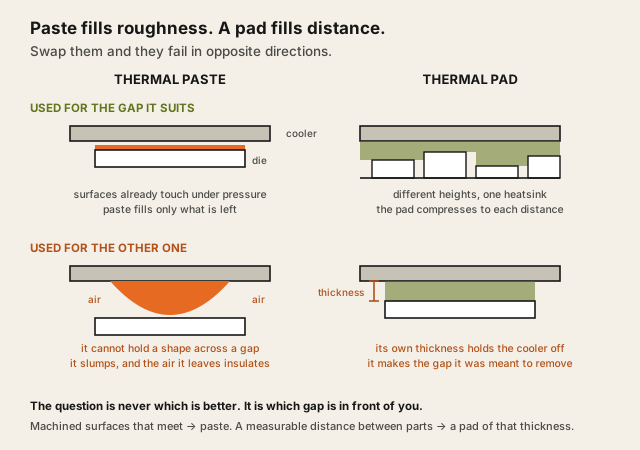
Paste fills microscopic gaps between surfaces that touch. Pads bridge real physical distance. Substituting one for the other makes temperatures worse.
Before you buy anythingThis page also considers Cleaning the heatsink and intakes first and Leaving it alone. Why, and when each is the better answer.
Contents
Paste goes between surfaces that touch under pressure — a cooler on a processor. Pads go where there is a real gap to bridge — memory chips and power components sitting below a heatsink's main contact face. Substituting one for the other makes temperatures worse, in both directions.
A note on this comparison: researched from what each material is formulated to do rather than from testing here. See how we test.
The short version
Cooler onto a processor → paste. Heatsink over components at differing heights → pads, at the specified thickness. Irregular gaps you cannot measure → putty. Machine that has never been cleaned → none of this yet.
| Criterion | Thermal paste (our pick) | Thermal pad |
|---|---|---|
| Choose this if | A cooler mounting onto a processor | A heatsink over components at differing heights |
| Gap it fills | Microscopic surface roughness | Real physical distance |
| Needs mounting pressure | Yes, surfaces must contact | Compresses to fit |
| Thickness matters | No — pressure sets it | Critically |
| Typical use | CPU and GPU dies | VRAM, VRM, drive heatsinks |
| Conductivity | Higher | Lower |
| Reusable | No | Rarely — usually takes a set |
| Failure if wrong | Slumps across a gap, insulates | Holds the heatsink off the die |
| Mess to remove | Moderate | Low |
The highlighted column is the more commonly needed of the two, not the better material — they are not substitutes and the comparison is about placement rather than quality.
Where the choice actually matters
On a processor, it is always paste. The cooler base and the heat spreader are machined flat and pressed together. What is being filled is surface roughness measured in microns, and a pad in that position is a millimetre of comparatively poor conductor between two things that were touching.
On a graphics card, it is both. The die takes paste; the memory chips and power delivery components sit at different heights under the same heatsink and take pads. This is where the thickness question becomes real, because those components are not all at the same level.
On an NVMe drive, it is a pad. The controller and the heatsink do not meet under machined pressure, and the pad's job is bridging that gap — which is also why leaving the protective film on it, discussed in does an NVMe SSD need a heatsink, defeats it entirely.
Where paste is genuinely enough
- A CPU cooler installation. Nothing else is needed.
- A cooler refit after cleaning. Paste on the die, and inspect existing pads rather than replacing by default.
- A machine with no discrete card being serviced. The pad question never arises.
Where paste falls short
- Any real gap. It slumps, thins in the middle and cracks at the edges, and after a few thermal cycles the interface is worse than a correctly sized pad.
- Vertical or inverted surfaces, where a thick paste layer will migrate under gravity and heat.
- Components at differing heights under one heatsink, which is the standard graphics card arrangement.
The decision, plainly
- CPU or GPU die → paste.
- Memory and power components under a shared heatsink → pads, matched to the specified thickness.
- Gaps you cannot measure confidently → putty, accepting the mess.
- NVMe drive under a motherboard heatsink → the pad already fitted, with the film removed.
- Machine over a year old that has never been cleaned → neither yet; clean it and measure.
This page contains affiliate links. If you buy through them, Ugly Fixes may earn a commission at no extra cost to you. Products are selected independently.
Thermal paste kit
Mid-range is fine. Seating the cooler evenly matters more than which paste is under it.
See current options(opens in a new tab, affiliate link)Affiliate link. Price shown on the merchant's site.
ARCTIC MX-6 thermal paste (4 g)
ARCTIC
Electrically insulating, with figures behind it: ARCTIC publishes a volume resistivity of 1.8 x 10^12 ohm-cm and a breakdown voltage of 7.5 kV/mm. Named because that is the property deciding whether over-application is a mess or a fault, and a generic paste recommendation cannot promise it.
Check price and availability(opens in a new tab, affiliate link)Affiliate link. Price shown on the merchant's site.
Thermal pad sheet
Buy the thickness the manufacturer specified. Sheets in mixed thicknesses cost little more and save a second order.
See current options(opens in a new tab, affiliate link)Affiliate link. Price shown on the merchant's site.
Whether any of this is worth doing at all is the prior question, and for most machines the answer is not yet — when to replace thermal paste covers the symptoms that genuinely point at the interface rather than at dust.
If this is not right for you
- Cleaning the heatsink and intakes first
- On a machine more than a year old this is far more likely to be the actual cause, and it costs nothing but an afternoon.
- Leaving it alone
- Thermal interface material degrades over years rather than months, and a machine running within specification has nothing to gain from being opened.
Questions people actually ask
Can you use thermal paste instead of a pad?
How do you know what pad thickness to use?
Do thermal pads need replacing when repasting?
Is putty better than pads for graphics cards?
Question this page did not answer? Ask it.