Audio & Voice
Ground Loops, and Why Desk Speakers Hum
A steady mains hum that changes when you touch the case is a ground loop. The common fix circulating online is genuinely dangerous — this one is not.
Contents
Never fix this by removing an earth pin. That is the advice you will find in forum threads, it does work, and it works by disconnecting the safety earth from a mains appliance — which is there so that a fault energising a metal case trips a breaker rather than waiting for a person.
Everything else on this page is a legitimate fix. That one is not, and it is common enough to belong in the opening rather than buried at the bottom.
A note on this guide: this rests on how earth paths and analogue signal grounds interact rather than on measurements taken here. See how we test.
The problem, as it appears
A steady low hum or buzz from desk speakers, present when nothing is playing, unchanged by the volume control or only partly affected by it. It often appears after adding something — a monitor, a subwoofer, an interface, a TV — rather than on day one.
The distinguishing test is simple: unplug the analogue audio cable between the computer and the speakers. If the hum stops instantly, the noise is arriving through that cable, and a ground loop is the most likely reason.
Why swapping cables disappoints
Because a ground loop is not caused by a bad cable. It is caused by two devices each having their own path to earth, and then being connected to each other by a cable whose shield also connects their grounds.
That creates a loop of conductor enclosing an area, sitting in a house full of mains wiring at 50 or 60 hertz. The loop picks up a small current, and that current appears across the audio ground as a voltage your amplifier faithfully reproduces as hum.
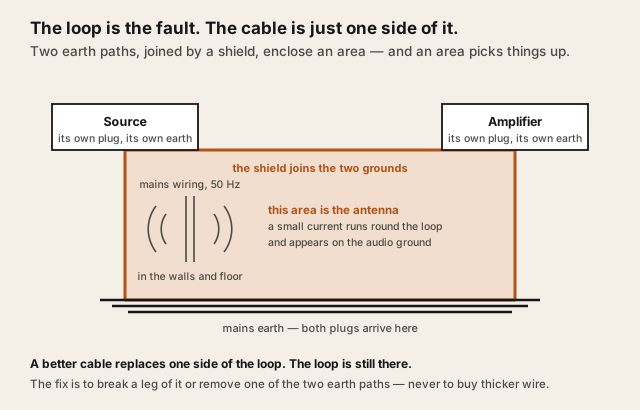
A better cable does not remove the loop. It is still two earth paths and a connection between them.
What actually matters
Which fault you actually have
Two different problems produce a similar noise and they have different fixes.
| Symptom | Ground loop (our pick) | Radiated interference |
|---|---|---|
| Changes when you touch a metal case | Often | Rarely |
| Changes when you move the cable | No | Yes |
| Stops when the analogue cable is unplugged | Yes | Yes |
| Stops if the devices share one socket | Often | No |
| Better shielding helps | No | Yes |
| An isolator helps | Yes | Not really |
Everything with a ground counts as a path
People look at the audio cable and the power leads and stop there. A ground loop can be completed by anything carrying an earth connection between the two devices — an HDMI or DisplayPort cable to a monitor that has its own mains lead, a TV aerial, an Ethernet cable in some installations, a USB connection.
That is why unplugging the aerial sometimes silences a system with no obvious connection to the aerial.
Fewer earth paths is the real fix
The clean approach is to reduce the number of separate routes to earth. Plugging every device in the audio chain into the same socket or the same strip is free, safe, and frequently sufficient, because it shortens the loop and equalises the reference.
That is the first thing to try after the diagnostic, and it costs nothing.
Digital links break the loop by design
If the audio never travels as an analogue signal between two mains-powered devices, there is no analogue ground to loop. Moving to a USB DAC, or to digital output, removes the mechanism rather than suppressing the symptom.
It is not universal — a bus-powered DAC still shares the computer's ground — but it works often enough to be the second thing to try.
The options, and who each suits
Sharing one socket suits everybody and costs nothing. Try it before buying anything.
This page contains affiliate links. If you buy through them, Ugly Fixes may earn a commission at no extra cost to you. Products are selected independently.
A ground loop isolator suits the case where the devices genuinely cannot share a supply, or where sharing did not help. It sits inline on the analogue signal and breaks the ground continuity through a transformer while passing the audio.
Audio ground loop isolator
The correct product for a true ground loop. Cheap isolators can roll off some low end — that is the trade for breaking the path.
See current options(opens in a new tab, affiliate link)Affiliate link. Price shown on the merchant's site.
A USB DAC suits anyone happy to move the conversion out of the computer. It addresses the cause rather than filtering the symptom, and it has other benefits covered in when a gaming headset needs a DAC.
USB headphone DAC
Removes the analogue ground path entirely. A bus-powered unit still shares the computer's ground, so it is likely rather than certain.
See current options(opens in a new tab, affiliate link)Affiliate link. Price shown on the merchant's site.
A better shielded cable suits the other fault — a buzz that changes when the cable is moved or routed near a power supply. For a genuine ground loop it will not help.
Shielded audio interconnect cable
For radiated interference, not for a ground loop. Use the table above to work out which one you have before buying.
See current options(opens in a new tab, affiliate link)Affiliate link. Price shown on the merchant's site.
An outlet tester suits ruling out the wall, which matters beyond the hum. A missing or bootlegged earth can produce this and is a safety problem in its own right — the instrument is reviewed at Klein RT210.
Surge protector outlet tester
Ten seconds, and it checks something that matters whether or not it turns out to be the hum.
See current options(opens in a new tab, affiliate link)Affiliate link. Price shown on the merchant's site.
The mistake to avoid
Lifting the earth. Ground lift adapters, cutting the earth pin, or using a two-pin adapter on a three-pin appliance all silence a ground loop by removing the protective earth. The equipment then has no fault path, and a failure that would have tripped a breaker instead leaves a metal case live.
If a device has a switchable "ground lift" on a balanced audio connection, that is a different thing — it lifts the signal ground on the audio connector, not the mains earth, and it is a legitimate control.
The second mistake is buying an expensive cable for a fault a cable cannot fix. Work out which of the two problems you have first; the table above takes a minute and saves the money. And if the noise turns out to be mechanical rather than electrical — a cabinet buzzing against a desk rather than a hum in the signal — that is desk speakers vibrating through everything.
Questions people actually ask
How do I know it is a ground loop and not a faulty speaker?
Why does unplugging the aerial or the monitor fix it?
Is defeating the earth pin a real fix?
Will a USB DAC fix it?
Does an expensive cable help?
Could it be the wiring in the wall?
Question this page did not answer? Ask it.