Cooling & Airflow
Fan Orientation, and Which Side Is Intake
Two arrows are moulded into the frame and neither is easy to see. Where to find them, the fallback that always works, and what a reversed fan actually costs.
Contents
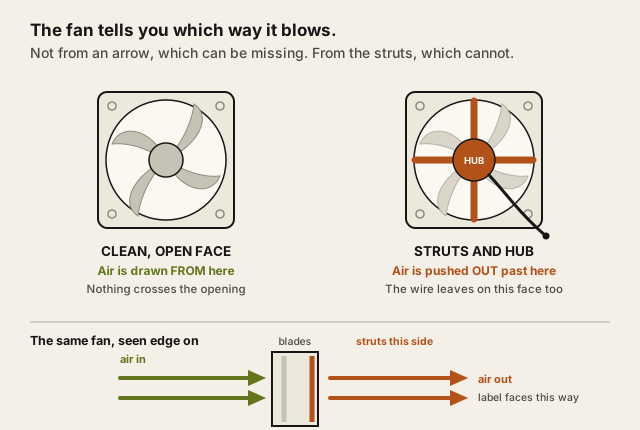
The side with the visible support struts is the outlet. That single rule settles it without finding a single marking, and it holds across essentially every axial fan you will ever fit.
If you want certainty, connect the fan outside the case and feel both sides. Thirty seconds, no ambiguity.
A note on this guide: this rests on how axial fans are constructed and marked, rather than on airflow measured here. See how we test.
The problem, as it appears
You have a fan in one hand and a case in the other, and there is no obvious front. Both faces look broadly similar. Somebody said there are arrows. You cannot see any arrows.
So it goes in whichever way looks right, and the machine works, and nobody finds out for two years.
Why looking for the arrows disappoints
Because they are moulded into the frame in the same colour as the frame.
There are usually two — one indicating airflow direction, one indicating blade rotation — and both are recessed into the plastic on one of the four narrow sides, often near a corner. Straight on, under normal room lighting, they are close to invisible.
Angle the fan against a light and they appear. That is the trick, and it is the entire reason the markings have a reputation for not existing.
What actually matters
The structure tells you, and it cannot be mislabelled
Look at both faces. One is a clean opening with the blades visible. The other has arms — three or four struts bridging the frame to hold the motor hub, and the wire emerging between them.
Air is drawn in through the clean side and pushed out past the struts. So:
- Smooth, open side → intake, the face air comes from
- Strutted side, wire visible → exhaust, the face air goes to
This is a consequence of how the fan is built rather than a convention someone chose, which is why it is more dependable than any marking. It is also the origin of the "label faces out" habit — the label sits on the hub, and the hub is on the strutted side.
Testing beats reading
Plug the fan in on the bench and hold a hand either side. One draws and one blows, unmistakably.
Doing this once with an unfamiliar fan is faster than searching for a moulded arrow, and it leaves you with a physical memory of which face is which rather than a rule you have to re-derive.
A reversed fan does not reverse the airflow, it reduces it
Worth understanding because it explains why the mistake is hard to spot.
A single fan fitted backwards among several does not turn the case into a negative-pressure machine. It fights the others. Total flow drops, the remaining fans work harder against the disturbance, and the outcome is a machine that is slightly warmer and slightly louder with no symptom pointing at a cause.
The version that does real damage is two fans on the same heatsink facing opposite ways, which happens on tower coolers in push-pull configurations. There the two are directly opposed across the fin stack, and the cooling loss is substantial.
Get the case direction right first
The fan's own orientation only means something relative to the case's intended flow, which on nearly every tower is front and bottom in, rear and top out — cool air enters low at the front, warm air leaves high at the back.
A CPU cooler should push through its fin stack in that same direction. A tower cooler oriented to blow toward the front panel is pulling warm exhaust back across the fins, and it presents as CPU temperatures that make no sense on a machine that is otherwise well built.
Filters belong on intakes only
Once you know which fans are intakes, filtration follows: filter the way in, leave the way out alone. A filter on an exhaust adds restriction for no benefit, because nothing is entering there.
The cost of that restriction, and the pressure argument that goes with it, are covered in dust filters and the airflow they cost.
The options, and who each suits
This page contains affiliate links. If you buy through them, Ugly Fixes may earn a commission at no extra cost to you. Products are selected independently.
Checking what you already have suits everyone and costs nothing. Open the side panel, identify each fan's strutted face, and confirm each one is pointing the way the case intends. It is a five-minute job that occasionally finds a real fault.
Replacement fans suit a machine that is correctly oriented and still unpleasant. Airflow at a stated noise level is the figure to compare, not the decibel number in isolation.
Low-noise static-pressure case fans
Confirm orientation on fitting — a new fan installed backwards undoes exactly what it was bought for.
See current options(opens in a new tab, affiliate link)Affiliate link. Price shown on the merchant's site.
For intake specifically, the ARCTIC P12 PWM PST is the one we would point at: intake is the side with a filter in front of it, and 2.2 mmH₂O of static pressure is the figure that decides whether a fan still moves air through one. Exhaust is the easier job and takes whatever you already own.
ARCTIC P12 PWM PST 120 mm case fan
ARCTIC
120 mm, 2.2 mmH2O static pressure and 56.3 CFM published together, which is the pairing worth comparing for a filtered intake.
Check price and availability(opens in a new tab, affiliate link)Affiliate link. Price shown on the merchant's site.
Filter mesh on the intakes suits a machine in a dusty room, and it is only sensible once you know which fans those are.
Magnetic PC dust filter mesh
Intakes only. On an exhaust it is restriction with nothing to catch.
See current options(opens in a new tab, affiliate link)Affiliate link. Price shown on the merchant's site.
Fan-mount covers suit unused mounting points, which are unfiltered openings that let air take the easy route in.
PC fan mount dust covers
An empty fan mount is an unfiltered intake whether you intended one or not.
See current options(opens in a new tab, affiliate link)Affiliate link. Price shown on the merchant's site.
A fan hub suits a machine with more fans than headers, and it is the thing that lets a curve apply to all of them rather than some.
PWM fan hub
Relevant once orientation is right — controlling fans that are fighting each other does not help.
See current options(opens in a new tab, affiliate link)Affiliate link. Price shown on the merchant's site.
The mistake to avoid
Assuming the fan came out of the box facing the way it should go in. Manufacturers ship fans in whichever orientation suited the packaging, and a fan pre-installed in a case is not evidence either, because cases are assembled quickly and this is a well-known place for it to go wrong.
The second mistake is treating orientation as the only variable. A correctly oriented fan pushing against a blocked filter, a closed front panel or a wall a few centimetres behind the exhaust is still not moving much air — the rest of that diagnosis is in what goes wrong with a gaming PC after year one.
Questions people actually ask
Where are the arrows on a case fan?
What if I cannot find them at all?
Is there a way to just test it?
What does a reversed fan actually cost?
Which way should a CPU cooler fan face?
Does the sticker side always face out?
Question this page did not answer? Ask it.